


All services offered by TransIP have support voor IPv6.
For your domains you can translate an IPv6 address to a domain-name using an AAAA-record. See also our guide 'how to create a DNS record for an ipv6 address?'.
For VPSs the IPv6 address can be found as follows:
Step 1
Log in to your control panel, navigate to the 'BladeVPS' tab and click the name of your VPS on the left.
Step 2
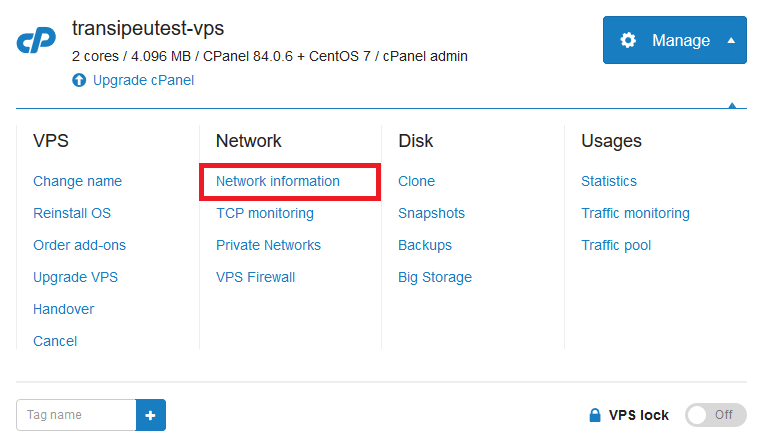
In the top right, click on 'Manage', followed by 'Network information'.
Step 3
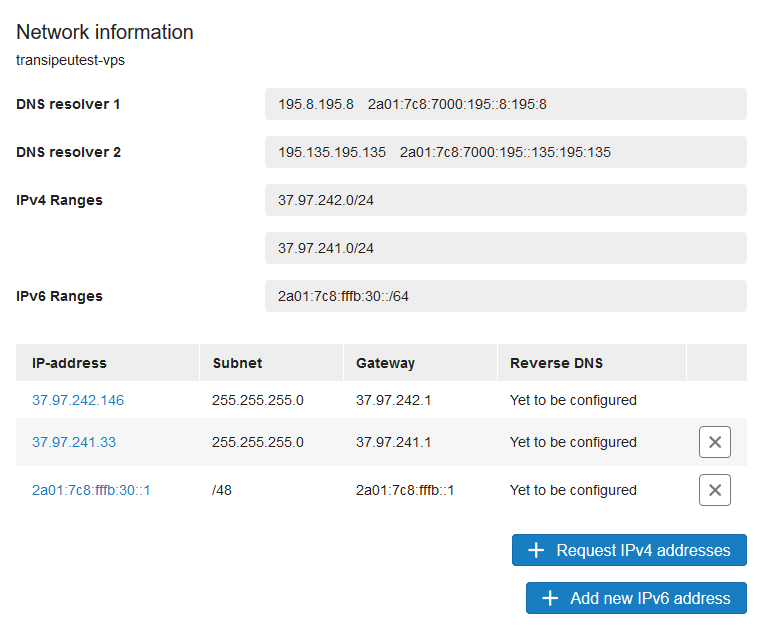
Your shown an overview of your IP addresses. The IPv6 addresses can be found under 'IP-address'.
Current IPv6 (and IPv4) addresses on your VPS can also be checked using command-line on a Linux VPS with the command:
ip aOr on a Windows VPS using cmd (start > cmd.exe):
ipconfigFor adding more IPv6 addresses on a VPS, see this tutorial for Linux or this tutorial for Windows.